Identifying Your Mustek Interface Card Most Mustek Flatbed scanners ship with a proprietary SCSI interface card. Over the years we have made several different cards. It is helpful if you know which card you have when discussing interface card issues with Mustek's Technical Support Department.
AX SCSI Card: The AX SCSI Card shipped with the MFS-6000CX and the MFS-12000CX approximately 3 to 4 years ago. The AX SCSI Card has a 3 position DIP switch that is used to assign a memory address range for the card. For example, when all three switches are up, the card's address is D400. The card will have AX SCSI REV. A or REV. B printed somewhere on it. The AX SCSI Card does not use an IRQ. The card's mounting bracket does not have a label on it identifying the card. There are no 32-bit drivers for this card. It is incompatible with 32-bit TWAIN applications in Windows 95. 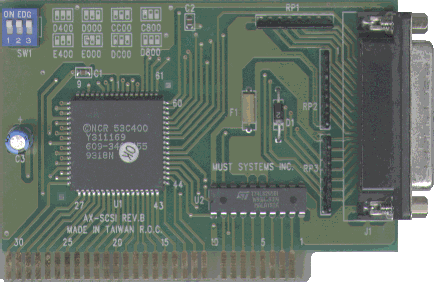
AZ SCSI Card: The AZ SCSI Card shipped with all Mustek flatbed scanners beginning approximately in early 1994 until summer of 1996. The AZ SCSI Card has a 3 position DIP switch which sets the I/O address for the card. For example, when all 3 switches are up, the card's I/O address is 280. The card will have AZ SCSI REV. A, REV. B, REV. C or REV. D printed somewhere on it. The AZ SCSI Card does not use an IRQ. The card's mounting bracket does not have a label on it identifying the card. 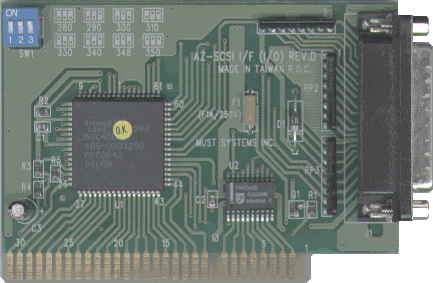
DTC-3181A: The DTC-3181A SCSI Card shipped with Mustek flatbed scanners beginning in March 1996. This is a switch-less interface card; however, it does have one jumper that should be removed (See Note). This card uses an I/O address that is set through software. The DTC 3181A SCSI Card does not use an IRQ. The card's mounting bracket has a label on it that says SCSI PORT. 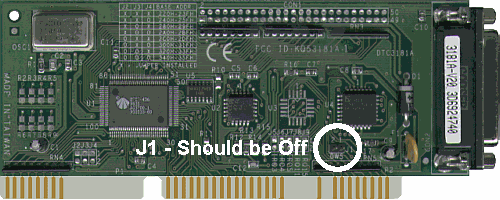
DTC-3181E: The DTC 3181E SCSI Card shipped with Mustek flatbed scanners beginning in January 1997. This is a switch-less interface card; however, it does have two jumpers. Jumper J1 should not ever be removed. Jumper J2 should be removed (See Note). This card uses an I/O address that is set through software. The DTC 3181E SCSI Card does not use an IRQ. The card's mounting bracket has a label on it that says SCSI PORT. 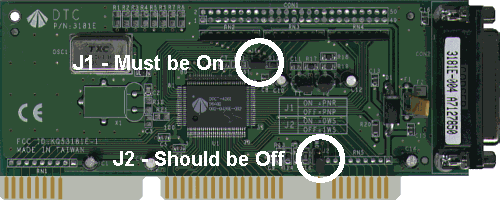
DTC-3181L: The DTC-3181L card began shipping with the Paragon 1200 III SP scanner in late 1997. Unlike the DTC-3181 A and E, the 3181L is a Plug-N-Play card when installed with the included DTC driver. The 3181L has two jumpers, J1 and J2. The J1 jumper must remain in the ON position, while J2 comes preset to the OFF position (See Note). 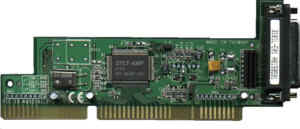
Adaptec AVA-1502P: The Adaptec AVA-1502P SCSI Card shipped with the 36-bit professional series scanners in the summer of 1997. This is a Plug-n-Play card. 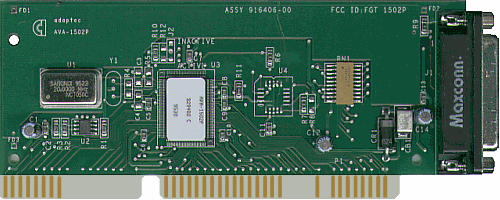
Adaptec AVA-1502AP: The Adaptec AVA-1502AP SCSI Card (or "pizza card") shipped with the 36-bit professional series scanners from late 1997 to present. This is a Plug-N-Play card. 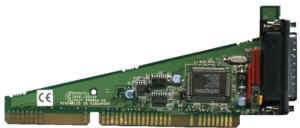
Special Note on DTC Jumper Settings: The J2 jumper found on the DTC-3181E and 3181L cards (or J1 on a 3181A card) control the card's wait state. These cards come factory set with the jumper OFF (covering one or no pins) which equals a 1 wait state. It is sometimes necessary on faster computers, usually Pentium 133 or above, to change the jumper to the ON position (covering both pins) thus giving the card a 0 wait state. When installing a DTC card, it is best to leave the jumpers in the factory preset position and attempt to install the software with those settings. If the card does not respond properly, adjusting the J2 jumper may be necessary. For more details on jumpers, click here. |