Installing Picture Publisher In Windows 3.1x

  1. Insert the Picture Publisher CD into your CD-ROM drive.
  2. In the Program Manager, open the File Menu and click Run.
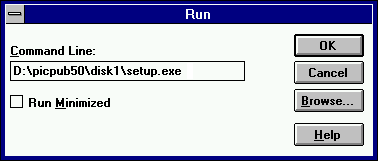
  3. Type the setup command as shown below. (If your CD-ROM drive letter is not D:, insert the appropriate letter in the command line. If you are unsure of your drive letter, you can see what it is by double-clicking My Computer.)

  1. Click OK to begin installation.
  2. Follow the onscreen prompts to complete installation.

NOTE: Picture Publisher installs an icon for Scanner Installation Help in Windows 3.1. Ignore the information in this help file as it is outdated. The information was intended for people who bought Picture Publisher as a standalone program. Since it was bundled with your scanner, the TWAIN driver installation was automatically done when you installed the Scanner Solutions CD and the TWAIN driver update disk.

Home - Drivers - Support - Products - Links - Contacts - Shop - Search

Copyright � 2000 Mustek, Inc.