Installing Picture Publisher In Windows 95/98 - Insert the Picture Publisher CD into your CD-ROM drive.\
- Click the Windows 95/98 Start Button and select Run.
- Type the setup command as shown below. (If your CD-ROM drive letter is not D:, insert the appropriate letter in the command line. If you are unsure of your drive letter, you can see what it is by double-clicking My Computer.)
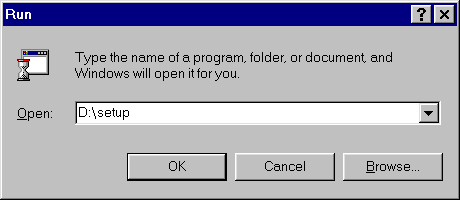
- Click OK to begin installation.
- After the Setup Wizard initializes, click Next.
- Enter your name and company name if applicable then click next.
- The next screen shows the Path on your Hard Drive where Picture Publisher will be installed. If you are not familiar with Paths, you should not change this. Click Next to continue the installation.
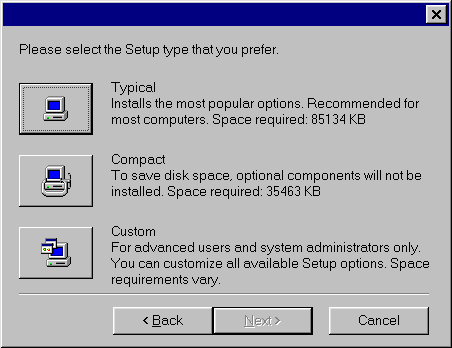
- The Picture Publisher CD contains 30 day trial versions of several Micrografx programs in addition to Picture Publisher including 35 MB of clipart. A full installation of all of the demo programs along with Picture Publisher requires approximately 85 MB of free hard drive space. If you do not want to install the demo programs, you should do a Custom Install and un-check the programs you don't want to install or do a Compact Install which only requires 35 MB of free disk space. Otherwise you should click Typical Installation.
- Follow the on-screen prompts to finish the installation of Picture Publisher.
|