 | Document # 7202 |
        |
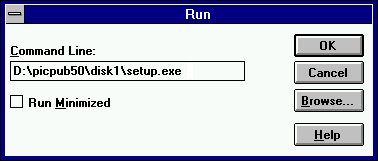
Installing Picture Publisher In Windows 3.1x1. Insert the Picture Publisher CD into your CD-ROM drive. 2. In the Program Manager, open the File Menu and click Run. 3. Type the setup command as shown below. (If your CD-ROM driveletter is not D:, insert the appropriate letter in the command line. Ifyou are unsure of your drive letter, you can see what it is by double clickingMy Computer.)
4. Click OK to begin installation. 5. Follow the onscreen prompts to complete installation. NOTE: Picture Publisher installs an icon for Scanner Installation Helpin Windows 3.1. Ignore the information in this help file as it is outdated.The information was intended for people who bought Picture Publisher asa standalone program. Since it was bundled with your scanner, the Twaindriver installation was automatically done when you installed the ScannerSolutions CD and the Twain driver update disk. |
| Mustek and the Mustek logo are trademarks and registered trademarksof Mustek, Incorporated. Any use without the express written permissionof Mustek is forbidden. Other company and product names may be trademarksor registered trademarks. |