 | Document # 7029 |
        |
InstallingScanner Solutions For The Plug-N-Scan Page Color II In Windows 95 |
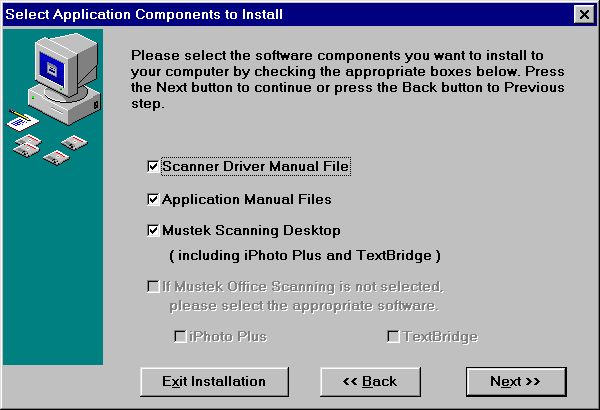
| 1. Insert the Scanner Solutions CD into your CD-ROM drive. 2. Click the Windows 95 Start button then click Run. 3. Type D:Setup95 then click OK. (This assumes your CD-ROM isthe D: drive. If it is another letter, replace the D shown here withthe proper drive letter.) 4. When the Welcome screen appears, click the Next button to begin installation. 5. The next screen allows you to control what folder on your hard drivethe software will be installed in. It is best to accept the default folderC:MSCAN so that if you ever call for Technical Support, we will know wherethe software is. Click the Next button to continue. 6. If this is a re-installation, you will be warned that C:MSCAN alreadyexists and asked if you want to install there anyway. Click the Yes button. 7. The next screen allows you to choose which scanning programs to install.
a. Putting a check mark next to Scanner Driver Manual Files will installmanuals for the scanner if selected. b. Putting a check mark next to Application Manual Files will installmanuals for iPhoto Plus and TextBridge Classic if they are also selected. b. Putting a check mark next to Mustek Scanning Desktop (Win 95 only),iPhoto Plus, and TextBridge Classic will install all of the software onthe Scanner Solutions CD. (You can’t install the Scanning Desktop by itselfbecause it uses both iPhoto Plus and TextBridge Classic when scanning) c. Un-checking Mustek Scanning Desktop and putting a check mark nextto iPhoto Plus will install the iPhoto Plus, an image editing and scanningprogram used for scanning photographs and graphics. d. Un-checking Mustek Scanning Desktop and putting a check mark nextto TextBridge Classic will install an OCR application that allow you toscan printed text documents into word processing applications for editing. 10. Clicking the Next button will display a list of the components you’vechosen to install. Click the Start Install button to continue. 11. Follow the onscreen prompts to complete installation. Reboot yourcomputer after the install program is complete. |
| Mustek and the Mustek logo are trademarks and registered trademarksof Mustek, Incorporated. Any use without the express written permissionof Mustek is forbidden. Other company and product names may be trademarksor registered trademarks. |