 | Document # 6530 |
        |
SPI Driver Open Failure |
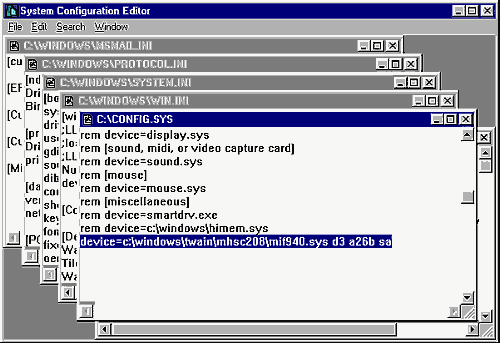
Description:You get an error message saying SPI Driver OpenFailure when you click on Acquire, particularly on IBM Aptiva Computers. Cause:Hand scanners have a device driver which loadsinto memory during bootup. If this driver didn’t load properly, you willget the error message. Solution:The scanner’s device driver is picky about whatorder it loads in during bootup. Move the device driver to the top of yourConfig.sys file and that should fix the problem. Referring to the diagrambelow, here are the steps to do this:
1. Start the System Configuration Editor. In Windows 95, click START then select RUN. Type in Sysedit and clickOK. In Windows 3.x, open the Program Manager’s File Menu and click RUN.Type in Sysedit and click OK. 2. Move the Config.sys file to the front. The blue title bar at topwill have the name of each file on it. The Config.sys file will be thesecond window back. 3. Locate the Twain device driver line and highlight it as in the abovediagram. It is usually at the bottom of the file. The device line may notmatch the above line exactly because it is different for various scanners. 4. Cut the device driver line to the Windows Clipboard by holding downthe Ctrl key and pressing the X key. 5. Move the cursor to the top line of the file and press the HOME keyon your keyboard. 6. Press enter one time then press the up arrow key to move the cursorto the blank line you just created at the top of the Config.sys file. Holddown the Ctrl key and press the V key to paste the device driver line backin. 7. Save the Config.sys file and reboot your computer. You should beable to scan now without getting the error message. If these steps don’t solve the problem, you may have a bad interfacecard. Call our Technical Support Department for further assistance. |
| Mustek and the Mustek logo are trademarks and registered trademarksof Mustek, Incorporated. Any use without the express written permissionof Mustek is forbidden. Other company and product names may be trademarksor registered trademarks. |