| Making PC TIFs with Color It! TIF (Tagged Image Format) graphic files can be saved in both PC and Macintosh formats. Using Color It!, you can create TIFs that can be viewed on, or e-mailed to, a PC user as long as they have a graphic program for viewing TIFs. Creating PC TIFs on Macintosh - First, scan in a picture and have it displayed in the untitled window in Color It!
- Click on File and Save As. The Save dialog box will appear.
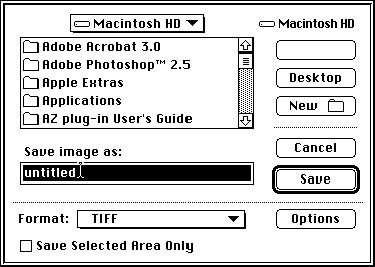
- Select TIFF from the format line and then click on Options to the right.
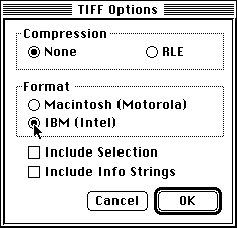
- On the TIFF Options dialog box, click the button in front of the IBM (Intel) option.
- Click OK.
- At the Save box, make sure to give the picture a file name. You will need to name it in a PC format (8 characters or less, no spaces) and the ".tif" extension. Example: PICTURE.TIF
- Click Save and the file will be saved.
|