Part 1: When to Use iPhoto Plus 4
Part 2: A Sample Scan with iPhoto Plus 4
Part 3: Taking the Tours and Viewing the Screenbook
Part 4: After the Scan: Saving, Printing, Re-Sizing
Part 5: Using the iPhoto Plus 4 Explorer
Part 6: Illustrated Examples of a Quick Card and Calendar Templates
Part 5: Using the iPhoto Plus 4 Explorer
The iPhoto Plus 4 Explorer is a tool designed to make the organization and retrieval of images easier. The iPhoto Plus 4 Explorer shows all of the drives and directory folders, just like the Windows Explorer. When a folder is opened with the iPhoto Plus 4 Explorer, any image files are displayed as thumbnails. A thumbnail is a miniature version of the image with the filename underneath. This makes it much easier to remember what an image file is even if the name has been forgotten. To use the iPhoto Plus 4 Explorer:
- Click on Start and select Programs. From Programs, select the iPhoto Plus 4 program group, and then click on the icon for the iPhoto Plus 4 Explorer.

- The iPhoto Plus 4 Explorer opens. The Explorer window is divided into two halves: the drives and directory folders on the left, and the image thumbnails on the right.
- Directory folders with a plus sign "+" next to them have subfolders.
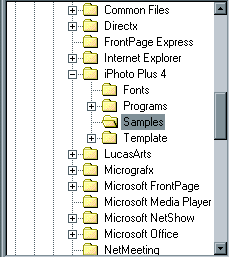
Clicking on the plus sign will drop the subfolders below the main folder. Subfolders with plus signs next to them have further subfolders, and so on, etc. Once the desired folder has been reached, double-click it to display any image files on the right hand side. - If nothing appears on the right hand side, then the chosen folder does not contain any image files. Image files will appear as thumbnails.
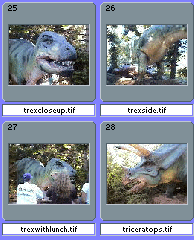
Simply double-click on the thumbnail to open the picture in iPhoto Plus 4. - Occasionally, a picture will appear as a piece of paper with a "Prohibited" red circle across it.

Image files that appear this way cannot be opened in iPhoto Plus 4, usually because they are in a format not compatible with iPhoto Plus 4.
Part 6: Illustrated Examples of a Quick Card and Calendar Templates
One of the popular features of iPhoto Plus 4 is the ability to create cards, calendars and other projects using the ready-made templates supplied with the program. The following tutorial will show the making of the two most popular projects, a card and a calendar, with step-by-step instructions and illustrations.
Making a Quick Card
Making a Calendar